exploreSE is a package that provides an interactive Shiny-based user interface for exploring transcriptional data and analysis results stored in SummarizedExperiment or DeeDeeExperiment format. The aim is to facilitate easy comparison between different model approaches on a single data set.
The package can be installed via the BiocManager by starting R and
running:
if (!requireNamespace("BiocManager", quietly = TRUE)) {
  install.packages("BiocManager")
}

BiocManager::install("exploreSE")
Alternatively, the development version can be installed via pak:
pak::pak("jaspitzer/exploreSE")
Once installed, the package can be loaded with the following bit of code:
library(exploreSE)
To explore the results of differential expression analysis, we need to organise them in a specific structure, and you will learn how to do that in this vignette. If you want to explore on your own, you can run the following code and start exploring the example data.
example(exploreSE, ask = FALSE)
For the purposes of this example, we’ll be using the airway data. It
is part of the
airway
package, containing RNA-Seq data from different airway smooth muscle
cell lines either untreated or treated with dexamethasone.
library(airway)
data(airway)
airway
#> class: RangedSummarizedExperiment
#> dim: 63677 8
#> metadata(1): ''
#> assays(1): counts
#> rownames(63677): ENSG00000000003 ENSG00000000005 ... ENSG00000273492
#>   ENSG00000273493
#> rowData names(10): gene_id gene_name ... seq_coord_system symbol
#> colnames(8): SRR1039508 SRR1039509 ... SRR1039520 SRR1039521
#> colData names(9): SampleName cell ... Sample BioSample
Out of the box, the airway object is a SummarizedExperiment object,
containing eight samples from four cell lines. This information is
available in colData(airway).
colData(airway)
#> DataFrame with 8 rows and 9 columns
#>            SampleName     cell      dex    albut        Run avgLength
#>              <factor> <factor> <factor> <factor>   <factor> <integer>
#> SRR1039508 GSM1275862  N61311     untrt    untrt SRR1039508       126
#> SRR1039509 GSM1275863  N61311     trt      untrt SRR1039509       126
#> SRR1039512 GSM1275866  N052611    untrt    untrt SRR1039512       126
#> SRR1039513 GSM1275867  N052611    trt      untrt SRR1039513        87
#> SRR1039516 GSM1275870  N080611    untrt    untrt SRR1039516       120
#> SRR1039517 GSM1275871  N080611    trt      untrt SRR1039517       126
#> SRR1039520 GSM1275874  N061011    untrt    untrt SRR1039520       101
#> SRR1039521 GSM1275875  N061011    trt      untrt SRR1039521        98
#>            Experiment    Sample    BioSample
#>              <factor>  <factor>     <factor>
#> SRR1039508  SRX384345 SRS508568 SAMN02422669
#> SRR1039509  SRX384346 SRS508567 SAMN02422675
#> SRR1039512  SRX384349 SRS508571 SAMN02422678
#> SRR1039513  SRX384350 SRS508572 SAMN02422670
#> SRR1039516  SRX384353 SRS508575 SAMN02422682
#> SRR1039517  SRX384354 SRS508576 SAMN02422673
#> SRR1039520  SRX384357 SRS508579 SAMN02422683
#> SRR1039521  SRX384358 SRS508580 SAMN02422677
In this vignette, we will subset airway to only contain protein-coding
genes. The required information is stored in its rowData, accessible
through rowData(airway).
rowData(airway)
#> DataFrame with 63677 rows and 10 columns
#>                         gene_id     gene_name  entrezid   gene_biotype
#>                     <character>   <character> <integer>    <character>
#> ENSG00000000003 ENSG00000000003        TSPAN6        NA protein_coding
#> ENSG00000000005 ENSG00000000005          TNMD        NA protein_coding
#> ENSG00000000419 ENSG00000000419          DPM1        NA protein_coding
#> ENSG00000000457 ENSG00000000457         SCYL3        NA protein_coding
#> ENSG00000000460 ENSG00000000460      C1orf112        NA protein_coding
#> ...                         ...           ...       ...            ...
#> ENSG00000273489 ENSG00000273489 RP11-180C16.1        NA      antisense
#> ENSG00000273490 ENSG00000273490        TSEN34        NA protein_coding
#> ENSG00000273491 ENSG00000273491  RP11-138A9.2        NA        lincRNA
#> ENSG00000273492 ENSG00000273492    AP000230.1        NA        lincRNA
#> ENSG00000273493 ENSG00000273493  RP11-80H18.4        NA        lincRNA
#>                 gene_seq_start gene_seq_end              seq_name seq_strand
#>                      <integer>    <integer>           <character>  <integer>
#> ENSG00000000003       99883667     99894988                     X         -1
#> ENSG00000000005       99839799     99854882                     X          1
#> ENSG00000000419       49551404     49575092                    20         -1
#> ENSG00000000457      169818772    169863408                     1         -1
#> ENSG00000000460      169631245    169823221                     1          1
#> ...                        ...          ...                   ...        ...
#> ENSG00000273489      131178723    131182453                     7         -1
#> ENSG00000273490       54693789     54697585 HSCHR19LRC_LRC_J_CTG1          1
#> ENSG00000273491      130600118    130603315          HG1308_PATCH          1
#> ENSG00000273492       27543189     27589700                    21          1
#> ENSG00000273493       58315692     58315845                     3          1
#>                 seq_coord_system        symbol
#>                        <integer>   <character>
#> ENSG00000000003               NA        TSPAN6
#> ENSG00000000005               NA          TNMD
#> ENSG00000000419               NA          DPM1
#> ENSG00000000457               NA         SCYL3
#> ENSG00000000460               NA      C1orf112
#> ...                          ...           ...
#> ENSG00000273489               NA RP11-180C16.1
#> ENSG00000273490               NA        TSEN34
#> ENSG00000273491               NA  RP11-138A9.2
#> ENSG00000273492               NA    AP000230.1
#> ENSG00000273493               NA  RP11-80H18.4
dim(airway)
#> [1] 63677     8
airway <- airway[rowData(airway)$gene_biotype == "protein_coding", ]
dim(airway)
#> [1] 22810     8
Let’s start our analysis. Using the
DESeq2
package, we will convert airway into a DESeqDataSet and build a
simple model based on the dexamethasone stimulation stored in the dex
variable.
library(DESeq2)
airway <- DESeqDataSet(airway, design = ~dex)
airway <- DESeq(airway)
baseline <- results(airway)
In addition, we’ll build a second model, where we control for the effect
of the cell line, stored in the cell variable:
design(airway) <- ~ cell + dex
airway <- DESeq(airway)
cell_controlled <- results(airway)
Using the DeeDeeExperiment package, we will store these results in their respective slots.
library(DeeDeeExperiment)
airway <- DeeDeeExperiment(airway)
airway <- addDEA(airway, baseline)
airway <- addDEA(airway, cell_controlled)
Let’s take a look:
airway
#> class: DeeDeeExperiment
#> dim: 22810 8
#> metadata(3): '' version singlecontrast
#> assays(4): counts mu H cooks
#> rownames(22810): ENSG00000000003 ENSG00000000005 ... ENSG00000273482
#>   ENSG00000273490
#> rowData names(50): gene_id gene_name ... cell_controlled_pvalue
#>   cell_controlled_padj
#> colnames(8): SRR1039508 SRR1039509 ... SRR1039520 SRR1039521
#> colData names(10): SampleName cell ... BioSample sizeFactor
#> reducedDimNames(0):
#> mainExpName: NULL
#> altExpNames(0):
#> dea(2): baseline, cell_controlled
#> fea(0):
In addition to differential expression analysis, we can also explore
functional enrichment results, in this case a GO over-representation
analysis (ORA). Here we use the get.gos() function from the
exploreSE package, but it just populates the FEA slot of the
DeeDeeExperiment.
airway <- get.gos(obj = airway, NAME = "baseline", gene_type = "ENSEMBL")
airway <- get.gos(obj = airway, NAME = "cell_controlled", gene_type = "ENSEMBL")
airway
#> class: DeeDeeExperiment
#> dim: 22810 8
#> metadata(3): '' version singlecontrast
#> assays(4): counts mu H cooks
#> rownames(22810): ENSG00000000003 ENSG00000000005 ... ENSG00000273482
#>   ENSG00000273490
#> rowData names(50): gene_id gene_name ... cell_controlled_pvalue
#>   cell_controlled_padj
#> colnames(8): SRR1039508 SRR1039509 ... SRR1039520 SRR1039521
#> colData names(10): SampleName cell ... BioSample sizeFactor
#> reducedDimNames(0):
#> mainExpName: NULL
#> altExpNames(0):
#> dea(2): baseline, cell_controlled
#> fea(4): baseline_up_go, baseline_down_go, cell_controlled_up_go, cell_controlled_down_go
Now that our data is ready, we can start exploring.
The simplest way to launch the app is through a call to the
exploreSE() function. Without any arguments, the app opens and you can
load in any .RDS file. Alternatively, you can supply the file
argument, defining the path to the file, or the object argument when
you have the object already loaded.
app <- exploreSE(object = airway)
shiny::runApp(app, port = 1234)
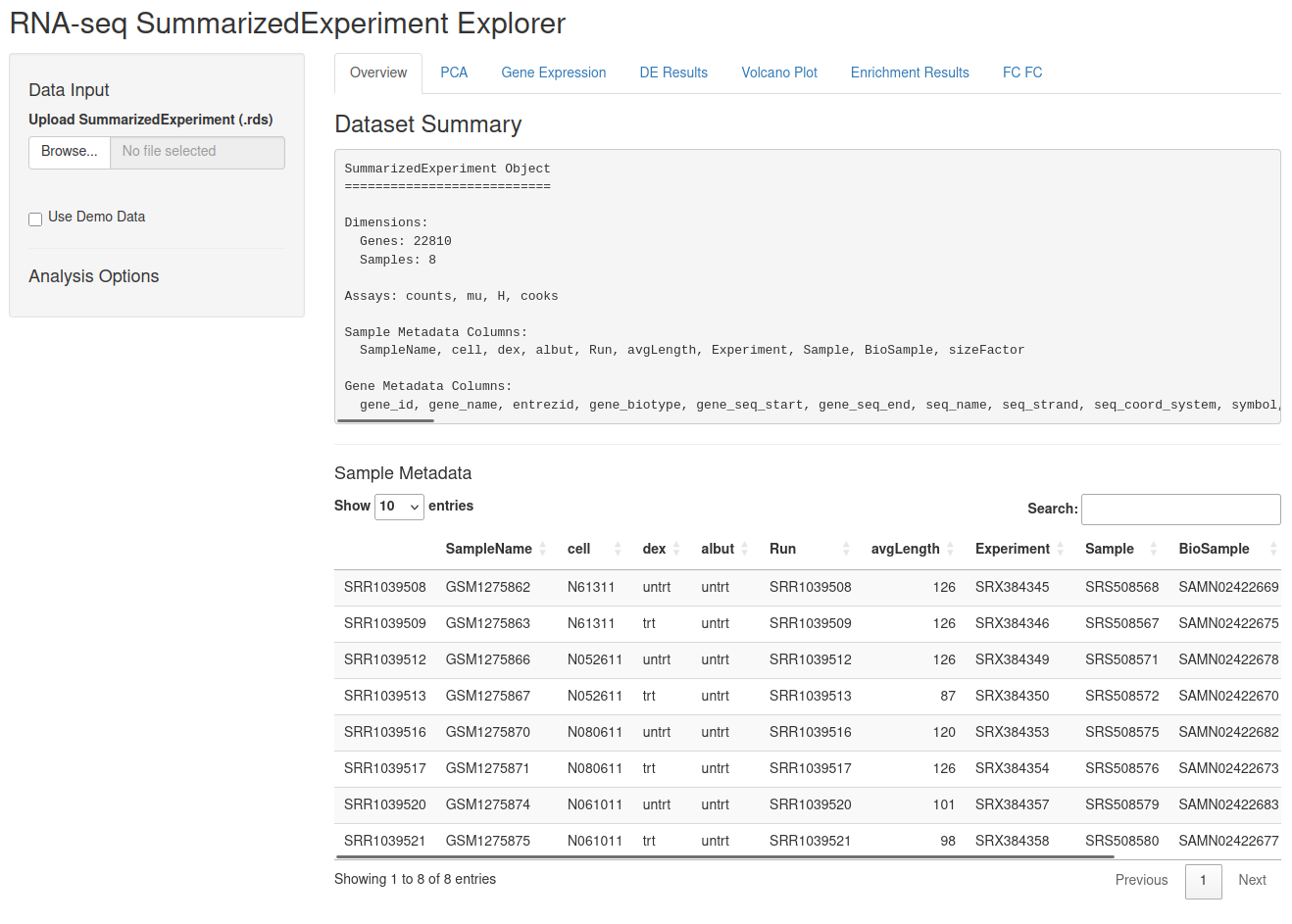
After starting the app, you are presented with an overview of the
metadata in the colData of the relevant SummarizedExperiment, as
well as a searchable and scrollable view of the same table. On the
left-hand side, you can load in a different object from the local
environment if desired under the “Data Input” header - should you start
up the app without any data, the “Use Demo Data” checkbox will be
checked and some demo data will be generated for you. Below that, you
will find some options for your data exploration throughout the app.
Options that are specific to one panel are integrated into that panel,
but globally relevant options appear in the sidebar as needed. You will
have your choice of the relevant gene identifier; by default it picks
the gene_name column of your rowData if present, and otherwise the
first suitable column, but this can be changed with the drop-down menu.
Secondly, you can pick your differential expression analysis; these come
from the relevant slots from the underlying DeeDeeExperiment or
metadata().
At the top, you have 8 tabs to choose from:
Progressing through the app, you can navigate to the PCA tab. 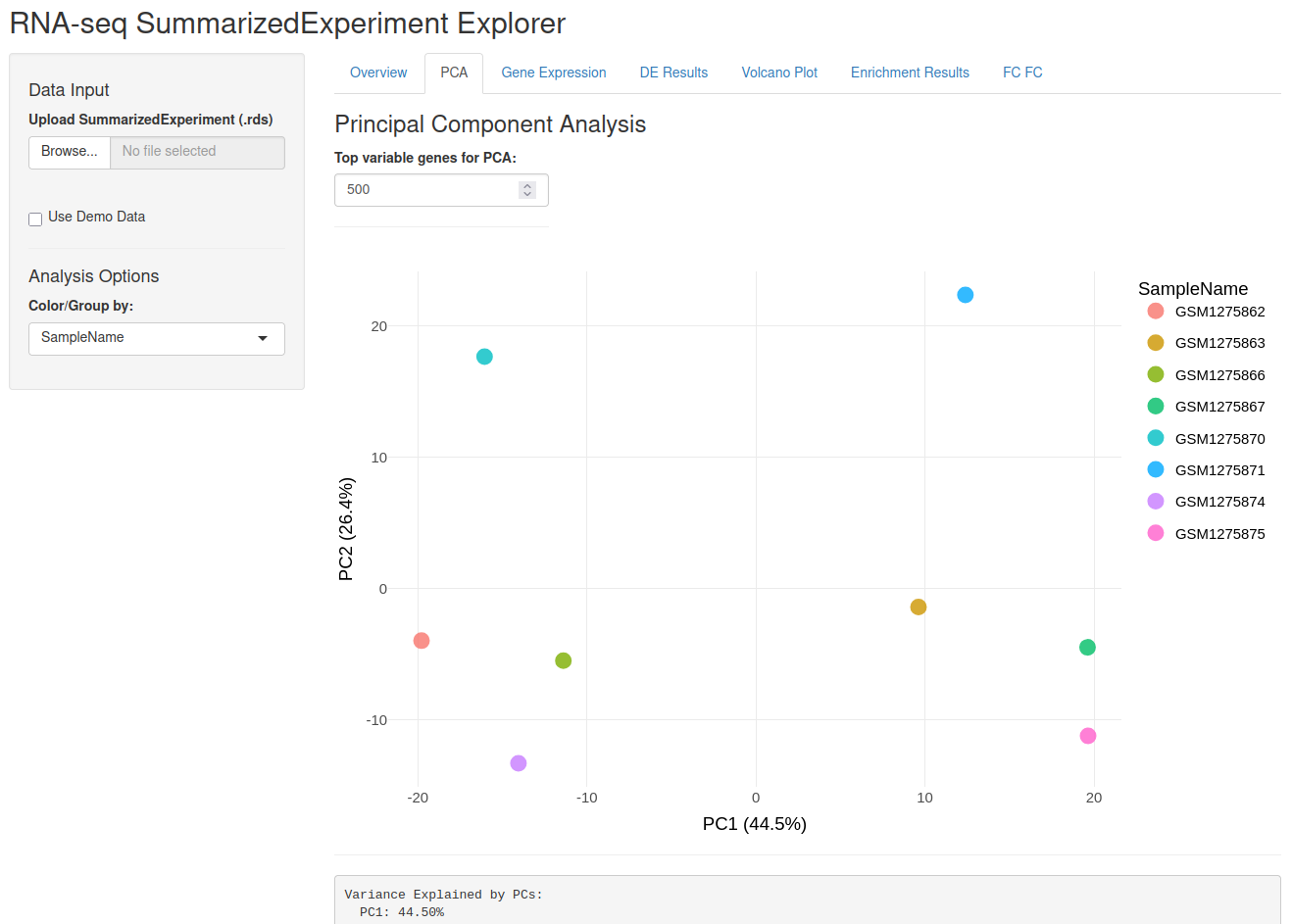
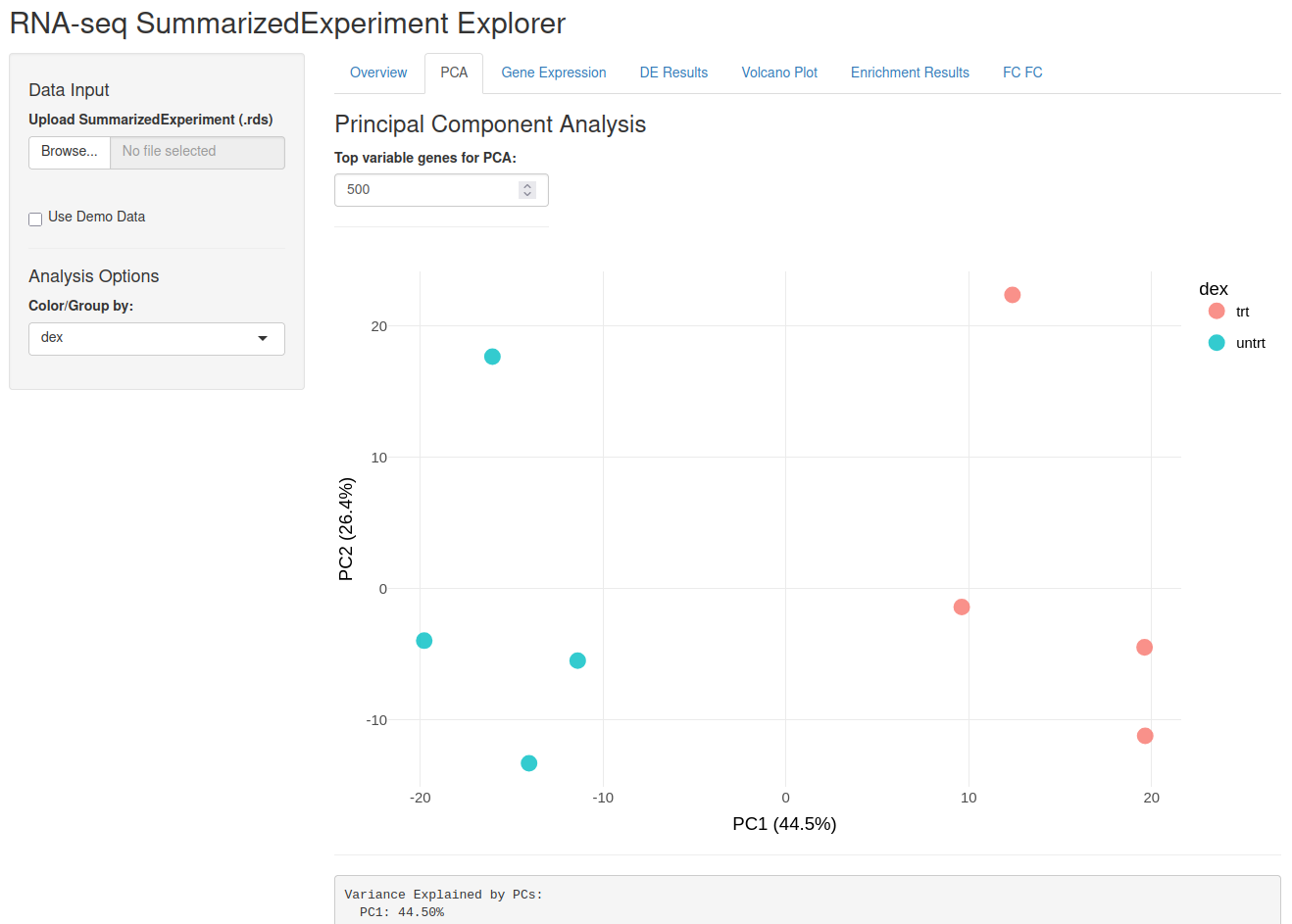
You can select the colouring scheme of the points in the drop-down menu,
as well as how many genes are used to calculate the PCA. In the airway
data set, the dexamethasone treatment, saved in the dex variable, is
the primary variable of interest, but you can also select others from
the drop-down menu.
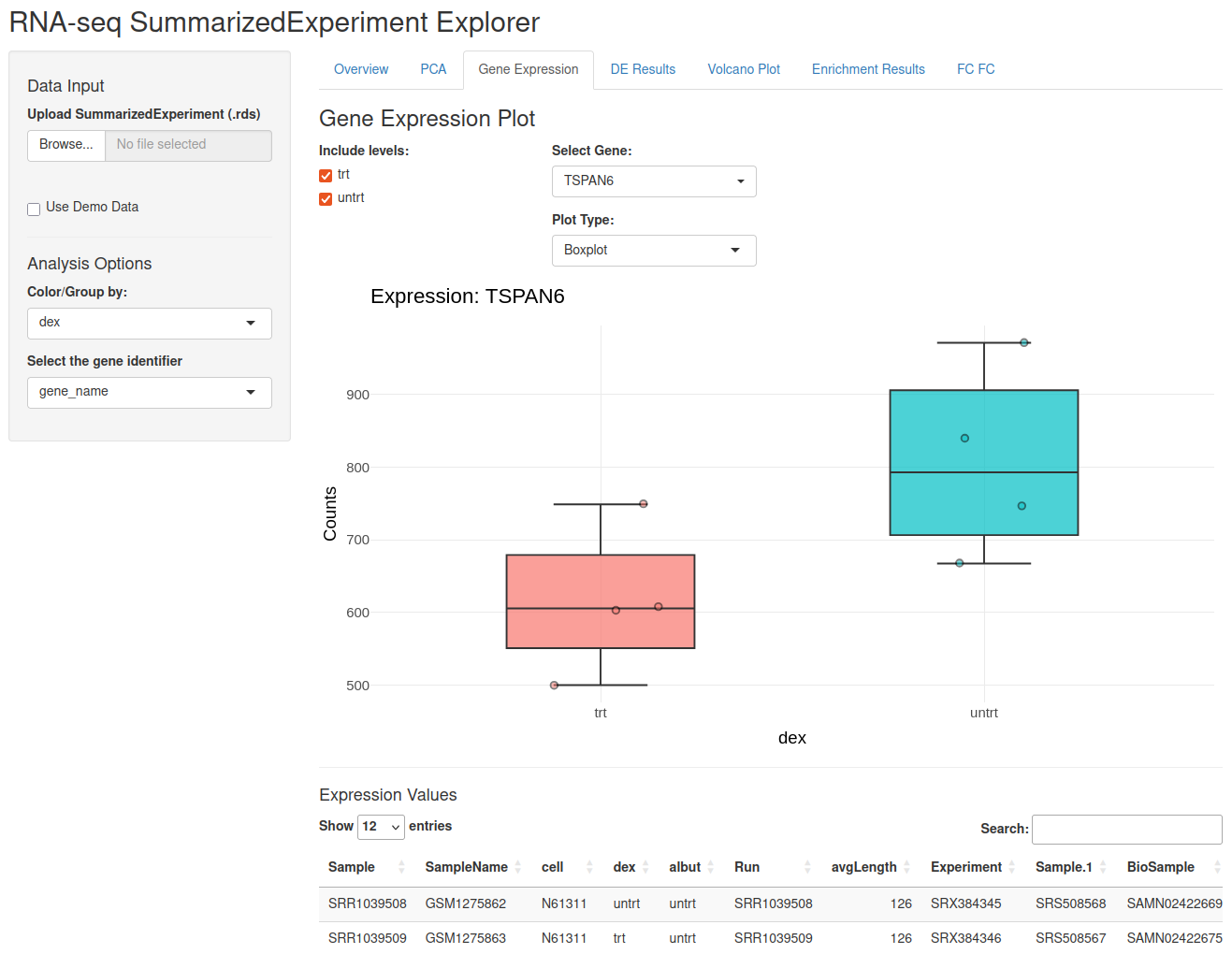
Navigating to the Gene Expression tab, you can check the expression of selected genes. By selecting a value in the Color/Group by drop-down menu, you can select the value on the x-axis. You can also include/exclude certain levels of that variable through the tick boxes on the left. The gene being plotted is selected by the “Select Gene” drop-down menu, which is searchable. Any values visible in the plot can be exported from the table below.
The heart of this application is the comparison of different possible models and within this tab, we are starting that process.
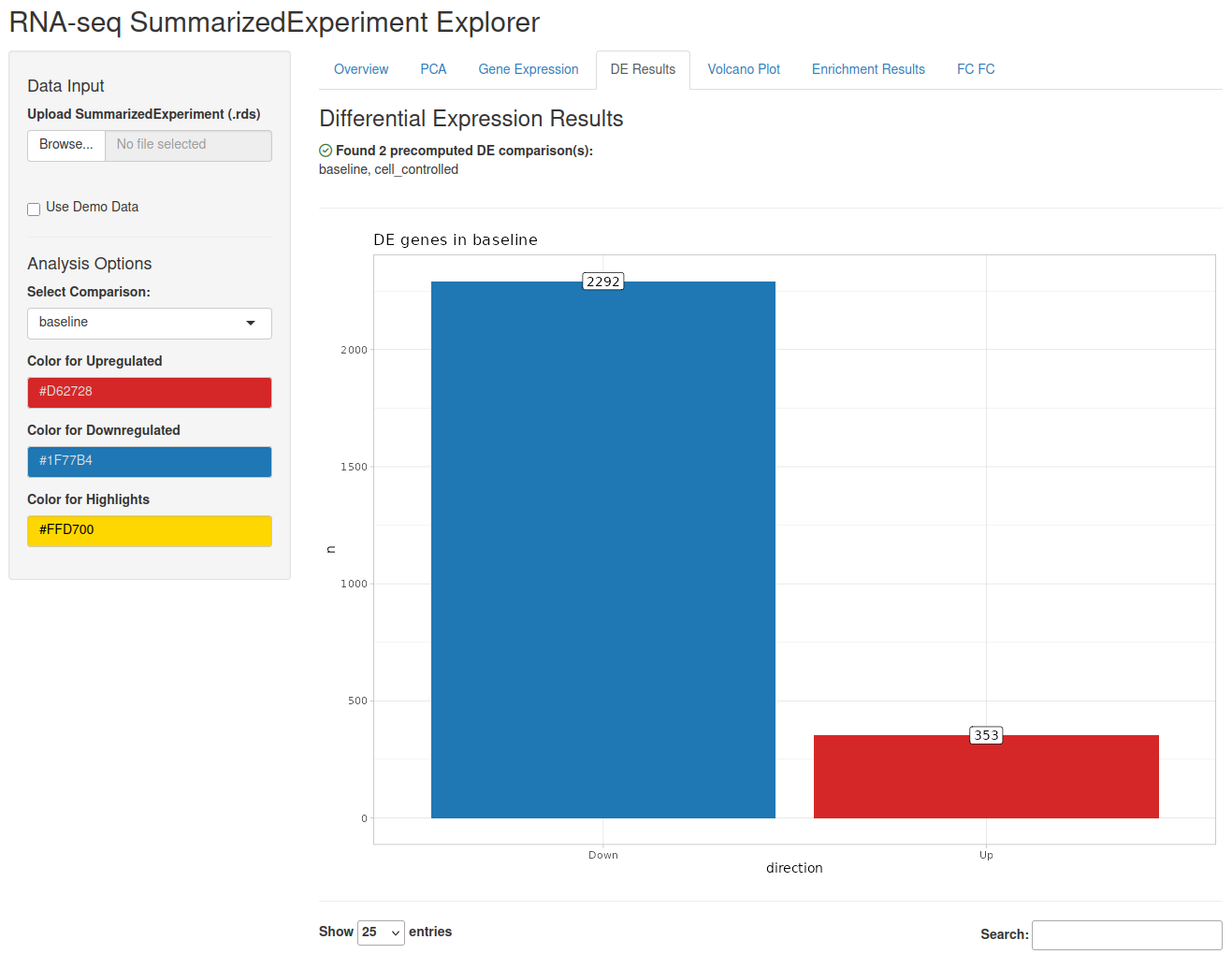
On the top of the page, a little overview indicates all the comparisons found in the respective slots. Below, a bar chart indicates the number of differentially expressed genes. The specifics of the results can be looked up in a table below and exported.
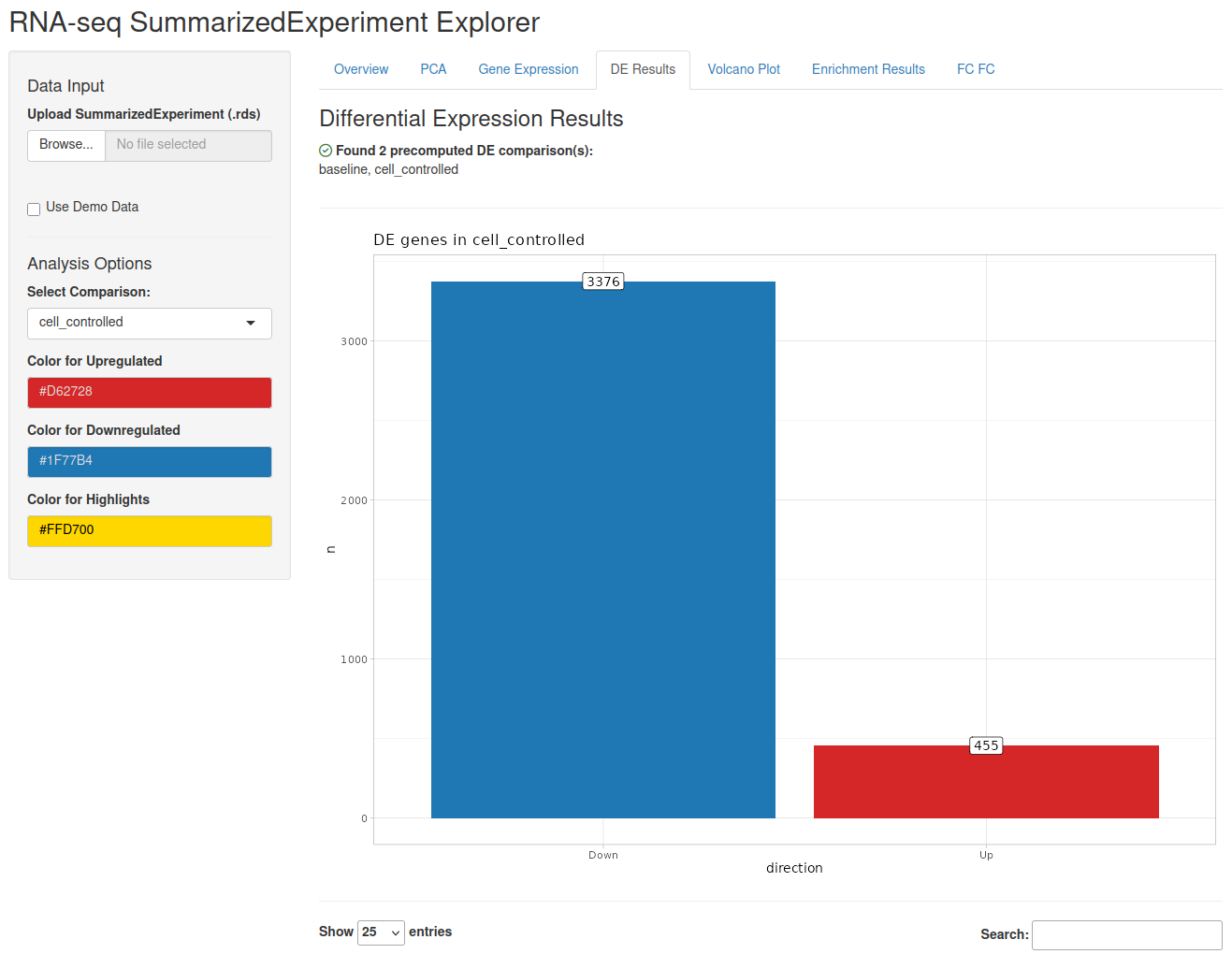
This view also exists for each comparison; selecting a different comparison from the drop-down menu on the left-hand side refreshes the view:
A graphical overview of the differential expression can be found in the Volcano Plot tab.
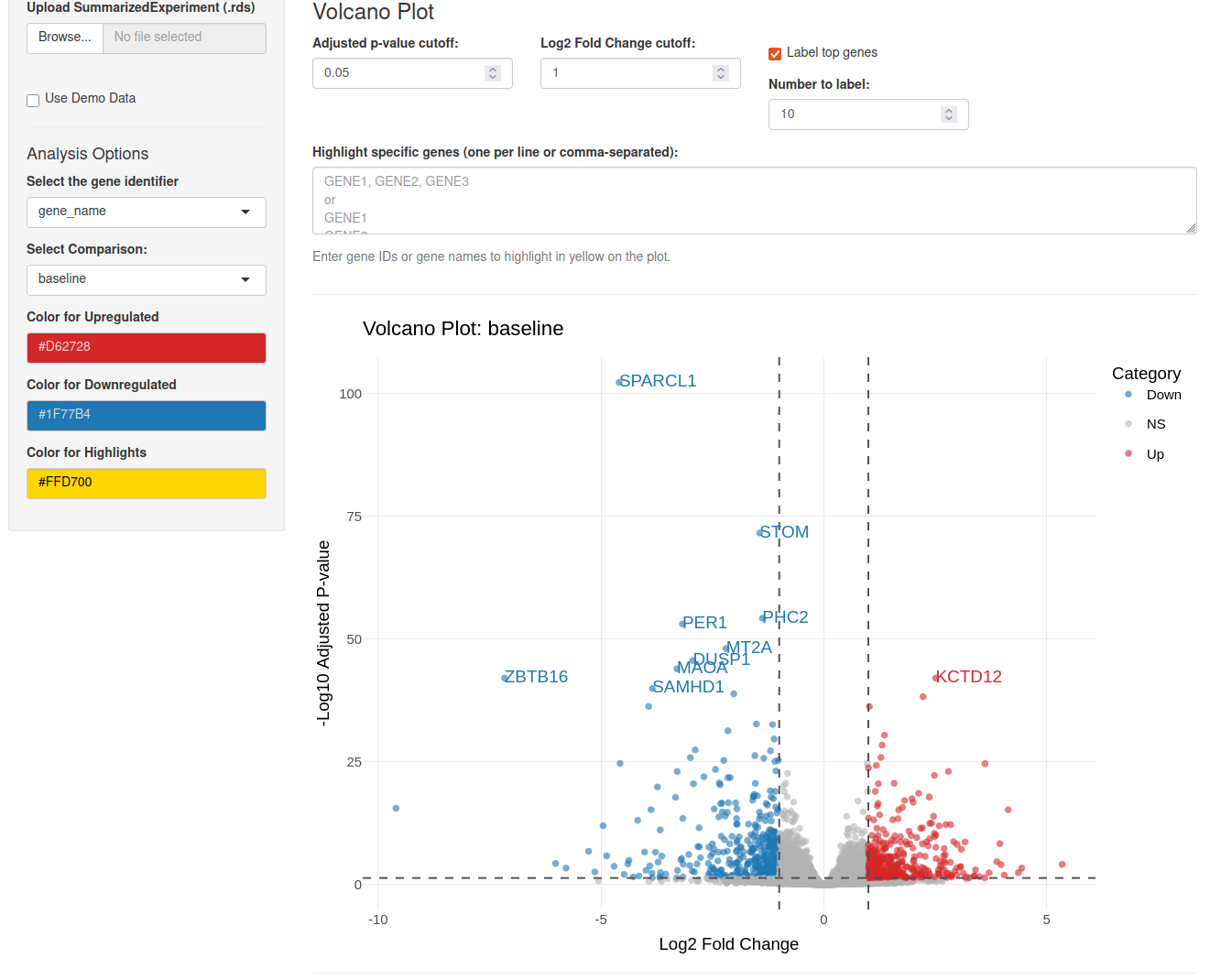
On the top of this tab, a variety of graphical settings can be set: the cutoffs for the different colours, a number of genes to label and the colour code are all freely changeable. Again, this view depends on the selected comparison.
For interpretation of these results, you often rely on the different enrichment methods to determine which biological themes or pathways are altered in a given comparison. These results are visualised in the Enrichment Results tab.
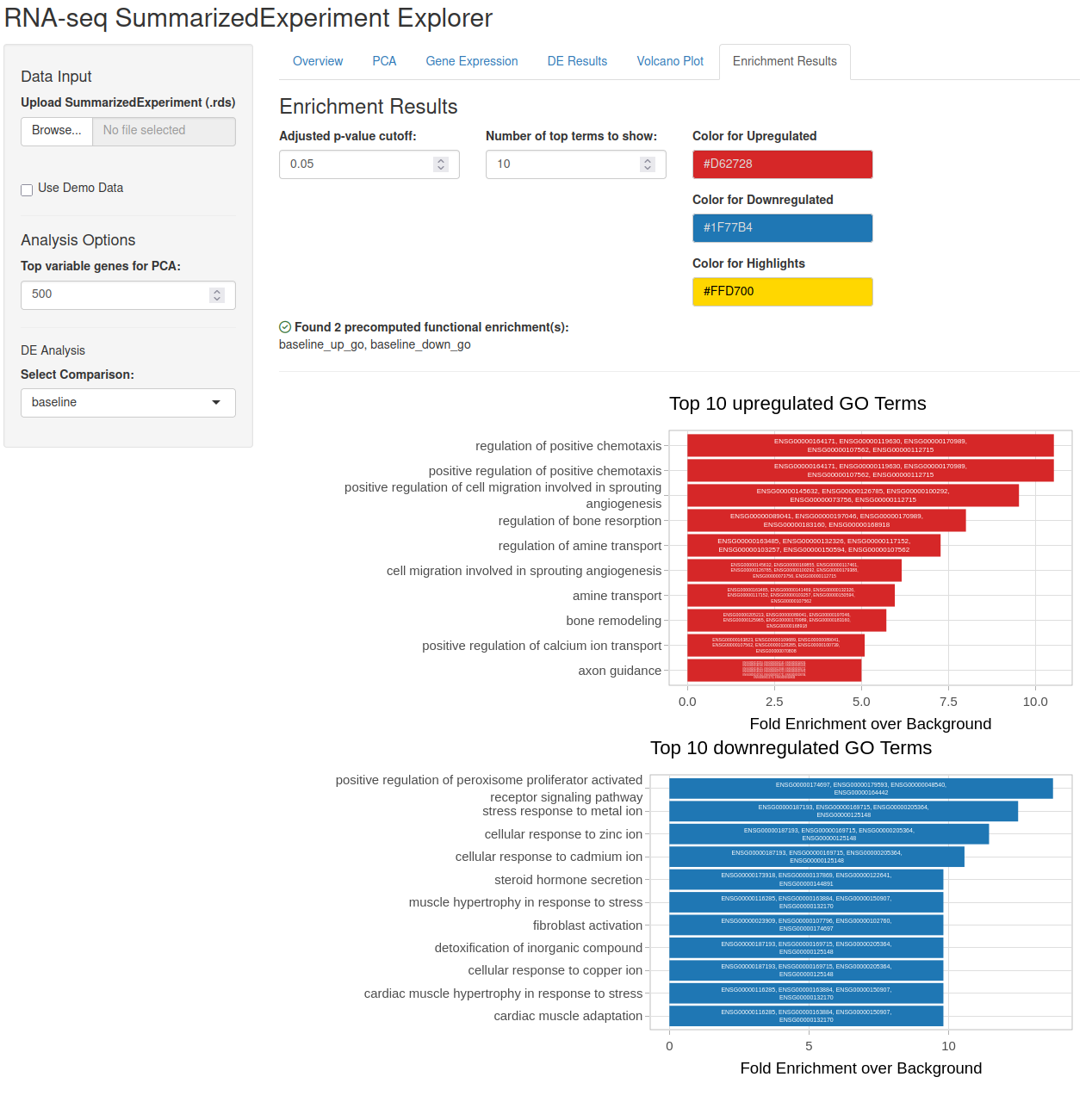
In this case, we are looking at the GO term enrichments for the baseline model. Like before, some graphical adjustments can be set at the top. Below, we have two bar charts, one for each direction of the comparison. The genes driving the enrichment can be shown inside the bars and upon hover after ticking the box in the options.
Direct comparison of fold changes across models can generate insights into the differences. For this, two models can be selected and their respective fold changes plotted against each other.
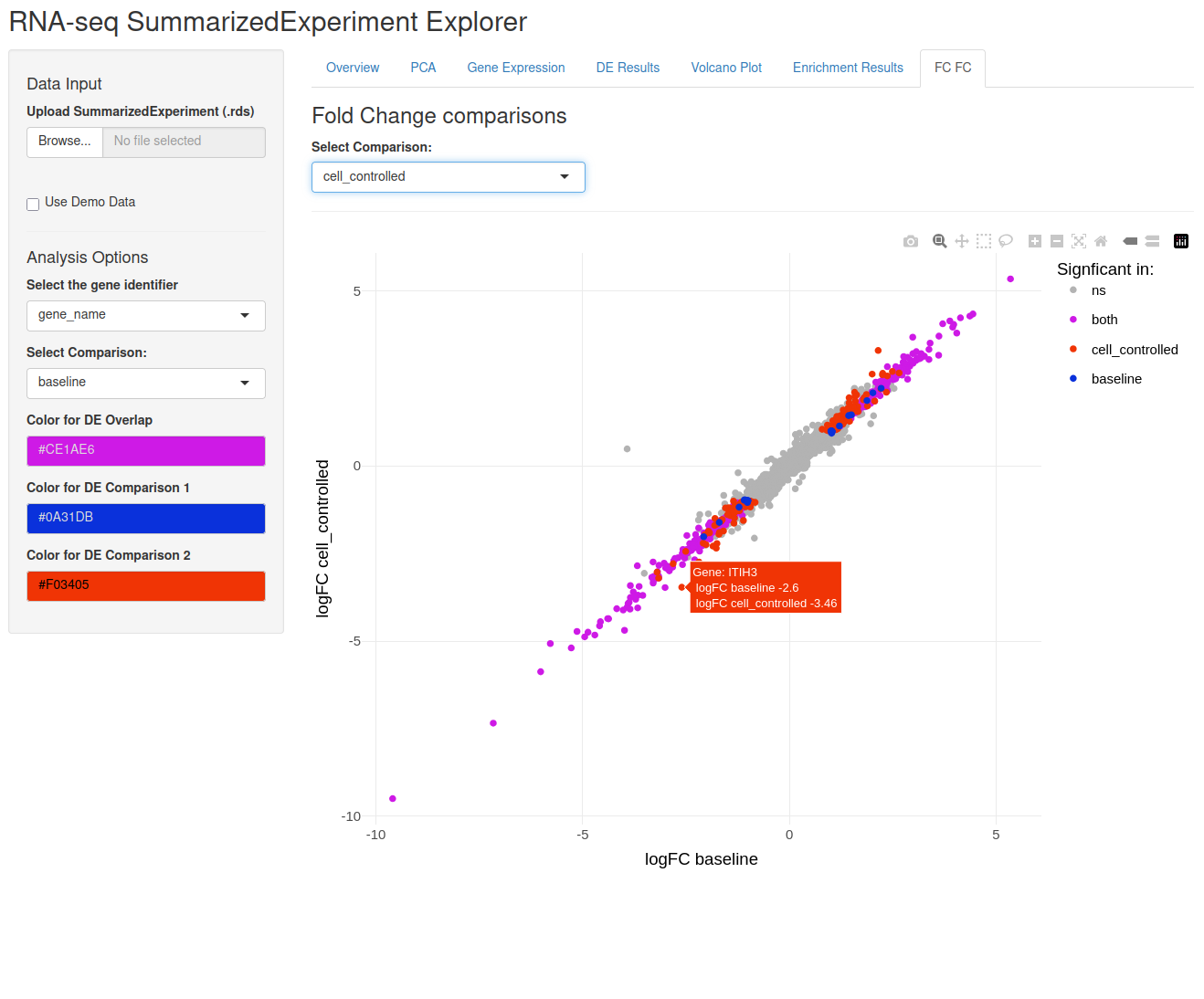
Below the plot, a table highlights genes with a fold change difference larger than the selected threshold (default: 1). This table can be downloaded.
One way to interpret your results is to put them into a larger context.
Looking for enriched biological themes, as above, is one way to do this,
but the context can also be more specific. In the Context tab of
exploreSE, you can add your own gene lists, for example known genetic
risk factors for the disease in question or genes of interest from other
experiments. To add a gene list, click the “Add context” button and
either paste the gene identifiers directly or upload a delimited file
with one gene list per column and the name of each context as its column
header. Please note that genes are matched only on the selected gene
identifier, so the list has to use the same type of identifier.
Context lists can also be passed when launching the app, as a named list
of gene vectors through the context argument of exploreSE(). The
names of the list are used as the context names. Here, we pass a set of
well-known glucocorticoid response genes, using gene symbols that match
the gene_name column of the rowData:
dex_response <- c(
  "FKBP5",
  "TSC22D3",
  "DUSP1",
  "PER1",
  "KLF15",
  "DDIT4",
  "ERRFI1",
  "NFKBIA",
  "MT2A",
  "ZFP36",
  "CRISPLD2"
)
app <- exploreSE(
  object = airway,
  context = list(dex_response = dex_response)
)
shiny::runApp(app, port = 1234)
The context is then overlaid on the volcano plot of the selected comparison, and its overrepresentation among both up- and downregulated genes is tested with a hypergeometric test, using all tested genes as the background.
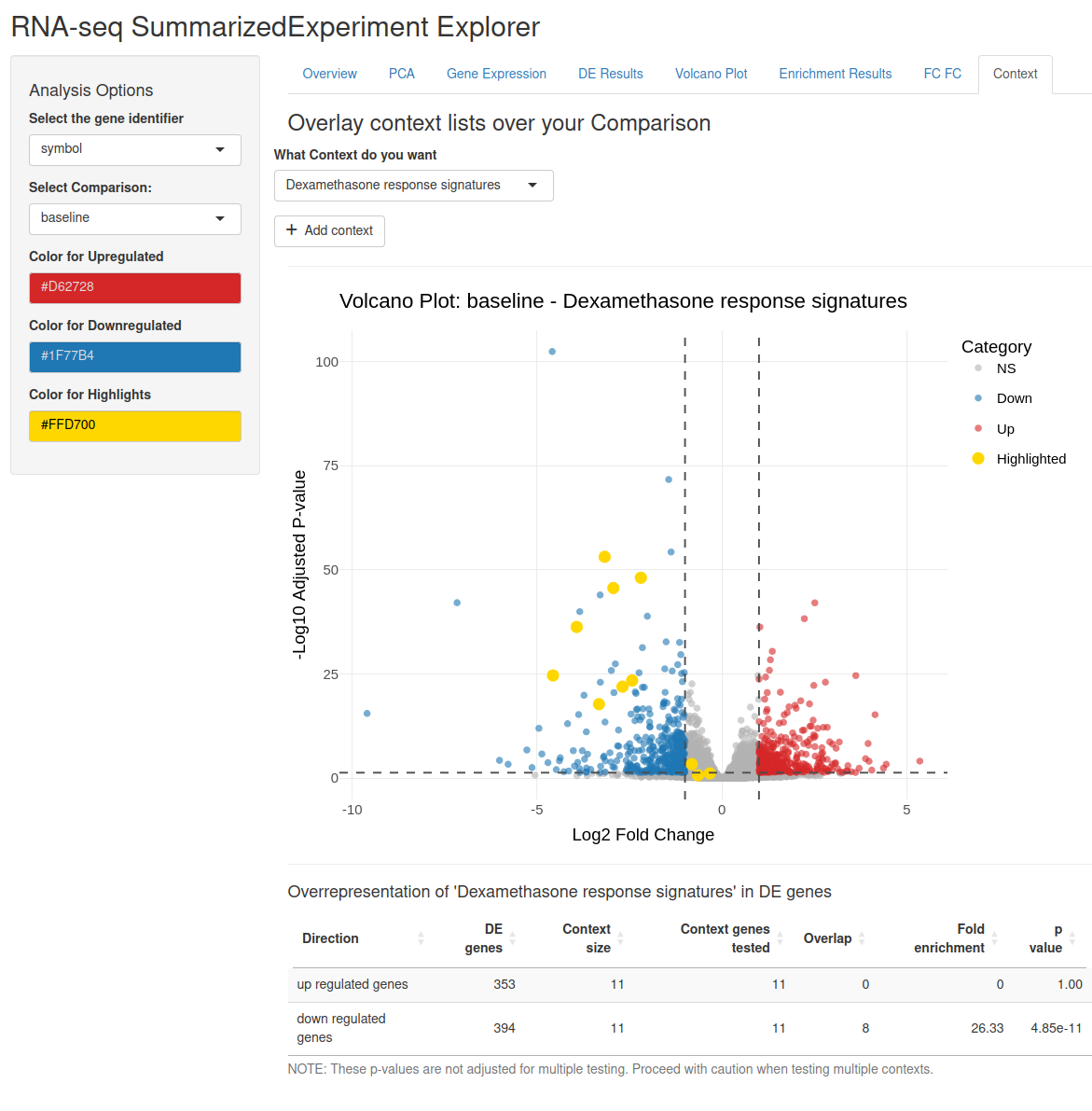
An important methodological note: the results of this overrepresentation
analysis should be taken with a grain of salt, since a) the p-values are
not adjusted for multiple testing and b) the (researcher-selected)
context is probably not independent of the experiment whose results are
being analysed. For example, the response signature shown here is partly
derived from the airway data set itself, so its enrichment is
circular.
Q: How do I add results into the SummarizedExperiment? A: The
easiest way is to use the DeeDeeExperiment extension of the
SummarizedExperiment class. You can use the dedicated DEA and FEA
slots. There is a detailed explanation
here.
If you do not want that, you can add them to the SummarizedExperiment
metadata, using de_results and fe_results as names.
Q: Can I use the explorer to perform analysis? A: No, this app is only designed to visualise already performed analyses. All decisions on what to test and which enrichments to run should happen before you start the app and make use of the package.
sessionInfo()
#> R version 4.6.0 (2026-04-24)
#> Platform: x86_64-pc-linux-gnu
#> Running under: Ubuntu 22.04.5 LTS
#>
#> Matrix products: default
#> BLAS:   /usr/lib/x86_64-linux-gnu/blas/libblas.so.3.10.0
#> LAPACK: /usr/lib/x86_64-linux-gnu/lapack/liblapack.so.3.10.0  LAPACK version 3.10.0
#>
#> locale:
#>  [1] LC_CTYPE=en_US.UTF-8       LC_NUMERIC=C
#>  [3] LC_TIME=de_DE.UTF-8        LC_COLLATE=en_US.UTF-8
#>  [5] LC_MONETARY=de_DE.UTF-8    LC_MESSAGES=en_US.UTF-8
#>  [7] LC_PAPER=de_DE.UTF-8       LC_NAME=C
#>  [9] LC_ADDRESS=C               LC_TELEPHONE=C
#> [11] LC_MEASUREMENT=de_DE.UTF-8 LC_IDENTIFICATION=C
#>
#> time zone: Europe/Berlin
#> tzcode source: system (glibc)
#>
#> attached base packages:
#> [1] stats4    stats     graphics  grDevices utils     datasets  methods
#> [8] base
#>
#> other attached packages:
#>  [1] DeeDeeExperiment_1.2.0      SingleCellExperiment_1.34.0
#>  [3] DESeq2_1.52.0               airway_1.32.0
#>  [5] SummarizedExperiment_1.42.0 Biobase_2.72.0
#>  [7] GenomicRanges_1.64.0        Seqinfo_1.2.0
#>  [9] IRanges_2.46.0              S4Vectors_0.50.1
#> [11] BiocGenerics_0.58.1         generics_0.1.4
#> [13] MatrixGenerics_1.24.0       matrixStats_1.5.0
#> [15] exploreSE_0.99.14
#>
#> loaded via a namespace (and not attached):
#>   [1] RColorBrewer_1.1-3      jsonlite_2.0.0          tidydr_0.0.6
#>   [4] magrittr_2.0.5          ggtangle_0.1.2          farver_2.1.2
#>   [7] rmarkdown_2.31          fs_2.1.0                vctrs_0.7.3
#>  [10] memoise_2.0.1           ggtree_4.2.0            htmltools_0.5.9
#>  [13] S4Arrays_1.12.0         SparseArray_1.12.2      gridGraphics_0.5-1
#>  [16] htmlwidgets_1.6.4       plyr_1.8.9              httr2_1.2.2
#>  [19] cachem_1.1.0            igraph_2.3.2            lifecycle_1.0.5
#>  [22] pkgconfig_2.0.3         gson_0.1.0              Matrix_1.7-5
#>  [25] R6_2.6.1                fastmap_1.2.0           digest_0.6.39
#>  [28] aplot_0.2.9             enrichplot_1.32.0       ggnewscale_0.5.2
#>  [31] patchwork_1.3.2         AnnotationDbi_1.74.0    aisdk_1.4.12
#>  [34] ps_1.9.3                RSQLite_3.53.1          org.Hs.eg.db_3.23.1
#>  [37] httr_1.4.8              polyclip_1.10-7         abind_1.4-8
#>  [40] compiler_4.6.0          bit64_4.8.2             fontquiver_0.2.1
#>  [43] withr_3.0.2             S7_0.2.2                BiocParallel_1.46.0
#>  [46] DBI_1.3.0               ggforce_0.5.0           MASS_7.3-65
#>  [49] rappdirs_0.3.4          DelayedArray_0.38.2     tools_4.6.0
#>  [52] otel_0.2.0              ape_5.8-1               scatterpie_0.2.6
#>  [55] glue_1.8.1              callr_3.8.0             nlme_3.1-169
#>  [58] GOSemSim_2.38.0         grid_4.6.0              cluster_2.1.8.2
#>  [61] reshape2_1.4.5          gtable_0.3.6            tidyr_1.3.2
#>  [64] XVector_0.52.0          ggrepel_0.9.8           pillar_1.11.1
#>  [67] stringr_1.6.0           yulab.utils_0.2.4       limma_3.68.4
#>  [70] splines_4.6.0           dplyr_1.2.1             tweenr_2.0.3
#>  [73] treeio_1.36.1           lattice_0.22-9          bit_4.6.0
#>  [76] tidyselect_1.2.1        fontLiberation_0.1.0    GO.db_3.23.1
#>  [79] locfit_1.5-9.12         Biostrings_2.80.1       knitr_1.51
#>  [82] fontBitstreamVera_0.1.1 edgeR_4.10.1            xfun_0.58
#>  [85] statmod_1.5.2           stringi_1.8.7           lazyeval_0.2.3
#>  [88] ggfun_0.2.0             yaml_2.3.12             evaluate_1.0.5
#>  [91] codetools_0.2-20        qvalue_2.44.0           gdtools_0.5.1
#>  [94] tibble_3.3.1            ggplotify_0.1.3         cli_3.6.6
#>  [97] systemfonts_1.3.2       processx_3.9.0          Rcpp_1.1.1-1.1
#> [100] png_0.1-9               parallel_4.6.0          ggplot2_4.0.3
#> [103] blob_1.3.0              clusterProfiler_4.20.0  DOSE_4.6.0
#> [106] tidytree_0.4.7          ggiraph_0.9.6           enrichit_0.1.5
#> [109] scales_1.4.0            purrr_1.2.2             crayon_1.5.3
#> [112] writexl_1.5.4           rlang_1.2.0             KEGGREST_1.52.0